By Shokat, founder of AuraLocal and RankProximity, with 14 years in local SEO. Last updated November 9, 2026.
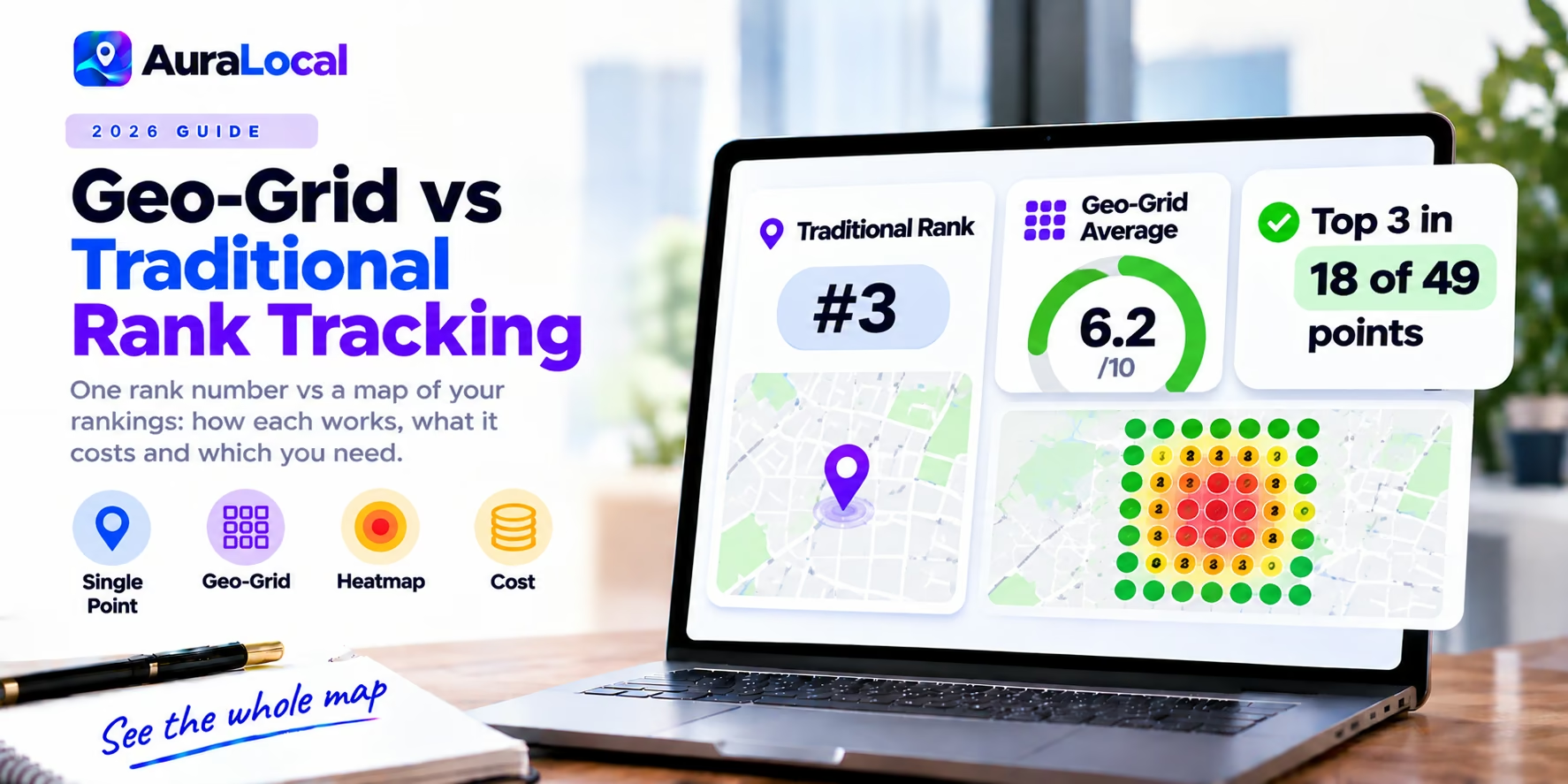
Ask a traditional rank tracker where your plumbing business ranks for "plumber near me" and you get one number, say position 3. Ask a geo-grid tracker and you get a map: first place near your office, fifth two miles north, not in the top 20 across the river. Both are "your ranking." Only one shows what most of your customers see.
This guide explains how each method works, what each costs, and which you need.
How traditional rank tracking works
A traditional (list-based) local rank tracker checks a keyword from one location, usually your city centre or postcode, and records your position in the local pack and organic results. It's simple, cheap to run daily, and good for tracking trends across many keywords.
The limitation: Google Maps results depend on where the searcher is. One check from one point can't show how your rankings change across the area you serve.
How geo-grid rank tracking works
A geo-grid tracker runs the same search from many points laid out around your business, often a 7x7 grid of 49 points, and plots your position at each one as a coloured heatmap. Green pins show where you rank in the top 3; red pins show where you're missing.
What it reveals:
- How far your visibility reaches before it drops off
- Which neighbourhoods competitors own
- Whether a change (new photos, reviews, a category fix) moved rankings across the area or only near your door
Side by side
| Traditional tracking | Geo-grid tracking | |
|---|---|---|
| What you get | One position per keyword | A map of positions across your area |
| Checks per keyword | 1 | 9 to 441 (3x3 to 21x21) |
| Best for | Many keywords, organic and pack trends | Map pack visibility across a service area |
| Cost | Low per keyword | Higher: each grid point is a search |
| Shows competitors by area | No | Yes, at each point |
What each costs
Because every grid point is a separate search, most geo-grid tools charge credits: one credit per point. A 7x7 grid uses 49 credits per keyword each time it runs. Updating 10 keywords daily on a 7x7 grid takes 14,700 credits a month per location, which is why the update schedule decides what you really pay. Some tools charge a flat price per business instead. Read free vs paid local rank trackers for real numbers.
Which do you need?
Use traditional tracking if: you track many keywords, care about organic rankings as much as the map pack, or serve customers mainly at one address and want a cheap daily trend line.
Use geo-grid tracking if: you depend on Google Maps leads, serve customers across a city or region, or need to show clients where they're winning and losing.
Use both if: you're an agency or multi-location business. Many teams track a long keyword list traditionally and their 5 to 10 money keywords on a grid.
Service-area businesses
Roofers, plumbers and cleaners without a storefront need a grid that covers the area they serve, not just their address. Choose a tool that lets you move the grid or place pins where your customers are. (Best rank tracker for service-area businesses)
Tools for each
| Tool | Traditional | Geo-grid |
|---|---|---|
| Whitespark | Local Rank Tracker ($14+/mo) | Local Ranking Grids ($10+/mo, separate) |
| BrightLocal | Yes | Geo-grid for up to 5 keywords |
| Local Falcon | No | 10 grid sizes, up to 21x21 |
| AuraLocal | No | 7x7 grid, 10 keywords per profile, daily, movable grid and pins |
| Semrush | Position tracking in SEO plans | Map Rank Tracker in Semrush Local |
AuraLocal is our product. Comparisons: AuraLocal vs Whitespark · AuraLocal vs Local Falcon · all local rank trackers compared.
Frequently asked questions
What is a geo-grid in local SEO?
A grid of points around a business from which the same search is run, showing the business's Google Maps position at each point as a heatmap.
What grid size should I use?
7x7 is a good default for a business serving one town. Use larger or wider grids for big service areas, and smaller grids to check one neighbourhood closely.
Is geo-grid tracking accurate?
It simulates searches from exact coordinates, which is closer to what real customers see than a single check. Results still vary by device and personalisation, so watch trends rather than single scans.
How often should I run a geo-grid scan?
Weekly is enough to spot trends; daily is useful when you're making changes or reporting to clients.
The bottom line
Traditional tracking tells you where you rank from one spot; geo-grid tracking shows where you rank across the area your customers search from. If Google Maps brings you business, you need the grid.
Run a free AuraLocal visibility scan to see your rankings across your area on a 7x7 grid. The 7-day trial needs no credit card.
About the author
Shokat has worked in local SEO for over 14 years. He founded RankProximity, a local SEO and Generative Engine Optimization agency, and built AuraLocal to give local businesses and agencies one place to track, diagnose and act on their Google Maps and AI visibility. See his agency's results at rankproximity.com/case-studies.
Sources
- Local Falcon pricing, for grid sizes and credits
- Whitespark pricing, for Local Rank Tracker and Ranking Grids
- BrightLocal pricing, for geo-grid coverage
Want to Improve Your Local Visibility?
Track rankings, monitor reviews, and grow your Google Business Profile with AuraLocal.
Get StartedRelated Articles
Continue exploring local SEO insights.